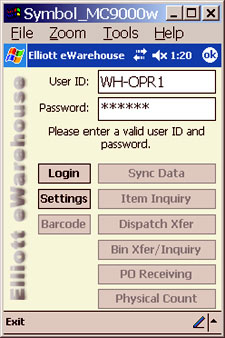
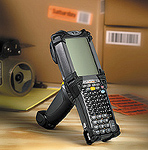
eWarehouse
isan add-on feature to Elliott's Warehouse
Management System.
eWarehouse provides greater flexibility by allowing you
to use a Windows Mobile Scanner to collect inventory data
for Physical
Inventory Count, Warehouse Receiving, Multi-Bin operations,
Stock Status Inquiry (by item/by bin), Inventory Transfer
between Bins and Item Barcode Printing.
This is the perfect solution to effectively operate your
warehouses. It is designed to work with the Internet or
local Intranet, which makes it an ideal remote warehouse
solution. So if you need a sophisticated yet simple and
efficient warehouse management system that gives your
warehouse personnel more flexibility, then Elliott's eWarehouse
is your solution.
eWarehouse
is available in two versions:
eWarehouse Login Integrates
with Elliott Security
Basic
Version
The Basic version of eWarehouse will allow you to use your
Windows Mobile Scanner to handle the following functions:
Collect Physical Count Data Right in
Front of the Bin
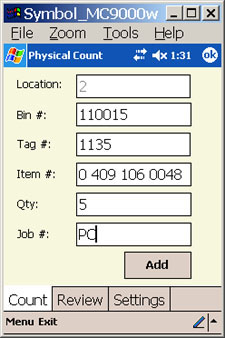
Physical
Inventory Count - Allows you to easily collect data
from your warehouse to perform a physical count. Once
the data is collected, it will be interfaced with Elliott's
Physical Count Processing. Since this method is more
efficient than the traditional, your physical count
can be done in less time and your warehouse can resume
normal operations quickly.
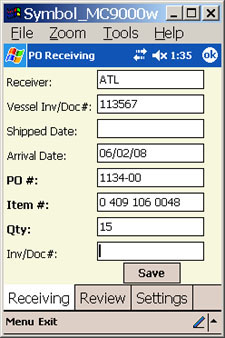
PO
Receiving - This function allows you to easily collect
data from your warehouse for PO Receiving. The data
collected on the mobile device will be interfaced with
the Elliott PO receiving function. This will eliminate
the need for office personnel to manually enter the
PO receiving data, increasing efficiency and accuracy.
Advance
Version
The
eWarehouse Advance version will support all operations found
in the Basic version. In addition, it will support multi-bin
operations, stock status inquiry, inventory transfer between
bins, and item barcode printing. You
can transfer data to Elliott seamlessly without a manual
interface step.
The
eWarehouse Advance version is designed to work with Elliott's
Multi-bin function. It can operate without Multi-bin, but
the value will be reduced.
Physcial
Inventory Count
PO
Receiving
Support
For Elliott's Multi-Bin - Elliott's Muti-Bin operation
centers around the Inventory Transfer function. The
eWarehouse will shift the traditional transfer functions
performed by running Elliott from a desktop workstation
to the portable scanner. This results in efficient realtime
data collection and accuracy. The supported processes
include working with shipping (pick ticket), putting
away inventory (post receiving) and production processing.
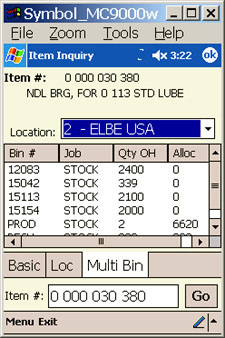
Stock
Status Inquiry (by item/bin) - This allows you to
view inventory by either entering or scanning the item
or bin number. The corresponding item or bin content
will be displayed.
Inventory
Transfer Between Bins - This is unplanned bin transfer
initiated by the warehouse. It can be used to consolidate
half full bins together to make space for future receiving.
Item
Barcode Printing - You can generate an item barcode
label using your Windows Mobile Scanner. This can be
used when the item or bin barcode label is damaged.
You will need to have the Bartender Barcode Printing
software to use this function.
Hardware
Requirements
eWarehouse
is designed to support the Symbol MC9000 series hand held
scanner device. It requires the Windows Mobile Operating System
to function. The eWarehouse Advance Version will require your
warehouse to have wireless coverage. It does not have to cover
the entire warehouse which may significantly reduce your wireless
hardware cost.